Vuex
概念
Vuex 是一个专为 Vue.js 应用程序开发的
工作流程
Vuex有5个重要的属性:
- state 存放状态
- mutations 成员操作
- getters 加工state成员给外界
- actions 异步操作
- modules 模块化状态管理
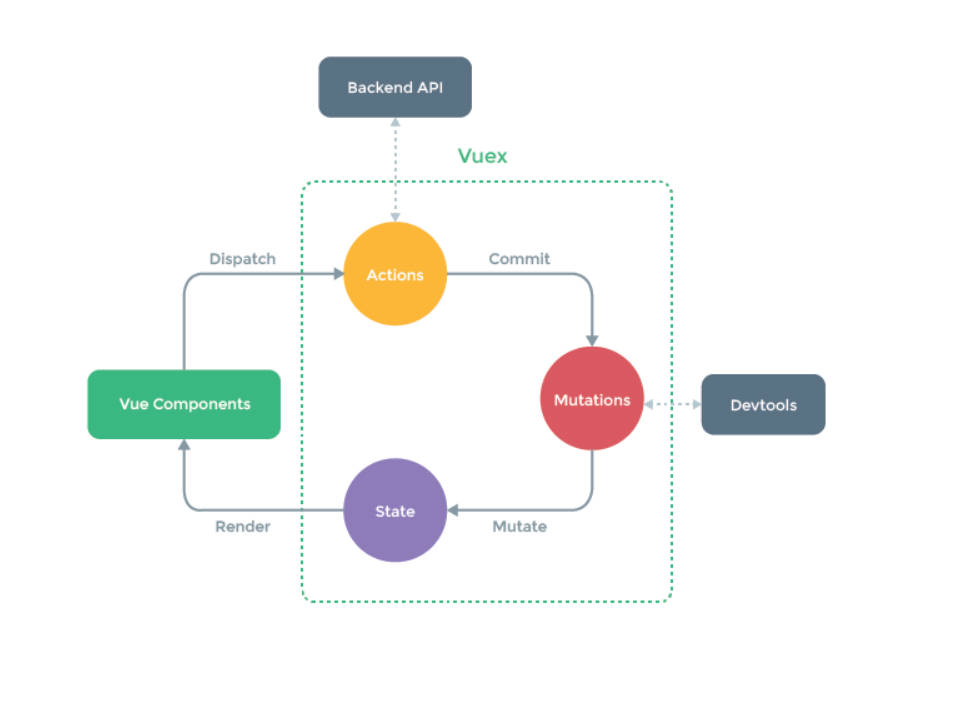
如图所示,首先 Vue 组件如果调用某个 VueX 的方法过程中需要向后端请求时或者说出现异步操作时,需要 dispatch VueX 中 actions 的方法,以保证数据的同步。可以说,action 的存在就是为了让 mutations 中的方法能在异步操作中起作用。
如果 actions 方法中没有任何操作,可以直接在组件内使用commit 来调用 mutations 中的方法。
使用Vuex(简单案例)
在使用之前首先要安装 Vuex,需要注意的是,本文案例使用的是vue2,目前npm install vuex 默认安装的是Vuex4,Vuex4在vue2中不能用。所以我们需要安装 Veux3
npm i vuex@3
创建一个store文件夹,文件夹下创建一个 index.js
import Vue from 'vue'
import Vuex from 'vuex'
Vue.use(Vuex)

//准备state——用于存储数据
const state = {
	count: 0
},
const mutations = {
  increment (state) {
      state.count++
  }
}
//创建并暴露store
export default new Vuex.Store({
	mutations,
	state,
})
注意
- Vue.use(Vuex) 使用Vuex插件
- new Vuex.Store 创建一个store
然后再 main.js 中引入 index.js,并注入到 Vue实例 中。
import Vue from 'vue'
import App from './App.vue'
import store from './store'
Vue.config.productionTip = false

new Vue({
	el:'#app',
	render: h => h(App),
	store
})
此时在组件模板中可以使用 $store.state 来获取状态对象,以及通过 $store.commit 方法触发状态变更:
<template>
	<div>
		<h1>{{$store.state.count}}</h1>
	</div>
</template>
computed: {
  increment() {
    this.$store.commit('increment')
    console.log(this.$store.state.count)
  }
}
注意
不能直接改变 store 中的状态(虽然能改),改变 store 中的状态的唯一途径就是显示地 提交(commit) mutation。这样使得我们可以方便追踪每一个状态的变化。
接下来我们具体来说一下 Vuex 中的各种属性
State(单一状态树)
state 就是Vuex中的公共的状态,和组件中的 data 类似,用于保存所有组件的公共数据。
//main.js
import Vue from 'vue'
import App from './App.vue'
import Vuex from 'vuex'

Vue.use( Vuex )

const store = new Vuex.Store({
  state:{
    products: [
      {name: '鼠标', price: 20},
      {name: '键盘', price: 40},
      {name: '耳机', price: 60},
      {name: '显示屏', price: 80}
    ]
  }
})

new Vue({
  el: '#app',
  store,
  render: h => h(App)
})
mapState 辅助函数
当一个组件需要获取多个状态的时候,将这些状态都声明计算属性会有些重复和冗余。
computed: {
  count() {
    this.$store.state.count
  },
  count2() {
    this.$store.state.count2
  },
  count2() {
    this.$store.state.count2
  }
}
为了解决这个问题,我们可以使用 mapState 辅助函数帮助我们生成计算属性。首先要引用 mapstate
import { mapState } from 'vuex'

export default {

  computed: mapState({
    // 箭头函数可使代码更简练
    count: state => state.count,

    // 为了能够使用 `this` 获取局部状态,必须使用常规函数
    countPlusLocalState (state) {
      return state.count2 + this.localCount
    }
  })
}
当计算属性的名称与 state 的子节点名称相同时,我们也可以给 mapState 传一个字符串数组。
computed: mapState(['count','count2'])

// 等同于
computed: mapState({
  count: state => state.count
  count2: state => state.count2
}}
计算属性(computed)是一个对象,mapState 返回的也是一个对象,上面案例我们将mapState作为计算属性的返回值,此时计算属性中不能再写其他方法。我们如何将它与局部计算属性混合使用呢?
此时就要使用到 es6 中的,对象展开运算符了。
computed:{
  // 相当于将mapState返回值对象中的属性,拿出来放到 computed对象中
  ...mapState({
      count: state => state.count
      count2: state => state.count2
  }},

  //其他方法
  computed1(){
    return "hello"
  }
}
Getter
getter 和组件中的计算属性(computed)类似,有时候我们需要从 store 中派生出一些状态,例如对列表进行过滤并计数:
computed: {
  doneTodosCount () {
    return this.$store.state.todos.filter(todo => todo.done).length
  }
}
如果有多个组件需要用到此属性,我们要么复制这个函数,或者抽取到一个共享函数然后在多处导入它——无论哪种方式都不是很理想。
Vuex 允许我们在 store 中定义 getter(可以认为是 store 的计算属性)。就像计算属性一样,getter 的返回值会根据它的依赖被缓存起来,且只有当它的依赖值发生了改变才会被重新计算。
Getter 可以接受两个参数。
- 第一个参数为 state
- 接受其他
getter作为第二个参数,将getters下的其他getter拿来用
const store = new Vuex.Store({
  state: {
    todos: [
      { id: 1, text: '...', done: true },
      { id: 2, text: '...', done: false }
    ]
  },
  getters: {
    doneTodos: state => {
      return state.todos.filter(todo => todo.done)
    },
    doneTodosCount: (state,getters) => {
     return getters.doneTodos.length
    }
  }
})
我们可以很容易地在任何组件中使用它:
computed: {
  doneTodosCount () {
    return this.$store.getters.doneTodosCount
  }
}
mapGetters辅助函数
和mapState一样。如果获取多个 getter 都声明计算属性会有些重复和冗余。此时就可以使用mapState。
import {mapGetters} from 'vuex'

export default {

  computed:{
    ...mapGetters(['doneTodos','doneTodosCount'])

    // 等价于
    ...mapGetters({
      doneTodos:(state) => this.$store.getters.doneTodos,

      doneTodosCount:(state,getters) => this.$store.getters.doneTodosCount
    })
  }
}
如果你想将一个 getter 属性另取一个名字,使用对象形式:
...mapGetters({
  // 把 `this.doneCount` 映射为 `this.$store.getters.doneTodosCount`
  doneCount: 'doneTodosCount'
})
Mutations
更改 Vuex 的 store 中的状态的唯一方法是提交 mutation。Vuex 中的 mutation 非常类似于事件:每个 mutation 都有一个字符串的 事件类型 (type) 和 一个 回调函数 (handler)。会接受 state 作为第一个参数
在开发中我们一般使用常量作为事件类型。
const store = new Vuex.Store({
    state:{
        counter: 1000
    },
    mutations: {
        INCERMRNT(state){
            state.counter++
        }
    },
})
在组件中使用 $store.commit 调用 INCERMRNT
this.$store.commit('INCERMRNT')
提交载荷(Payload)
就是在使用this.$store.commit同时传入额外的参数。即 mutation 的 载荷(payload)
const store = new Vuex.Store({
    state:{
        counter: 1000
    },
    mutations: {
        INCERMRNT(state,n){
            state.counter += n
        }
    },
})
methods: {
    add(){
      this.$store.commit('INCERMRNT',5)
    }
}
在大多数情况下,载荷应该是一个对象,这样可以包含多个字段并且记录的 mutation 会更易读:
// ...
mutations: {
  INCERMRNT (state, payload) {
    state.count += payload.amount
  }
}
this.$store.commit('INCERMRNT', {
  amount: 10
})
mapMutations
你可以在组件中使用 this.$store.commit('xxx') 提交 mutation,或者使用 mapMutations 辅助函数将组件中的 methods 映射为 store.commit 调用(需要在根节点注入 store)。
import { mapMutations } from 'vuex'

export default {
  // ...
  methods: {
    ...mapMutations([
      'increment', // 将 `this.increment()` 映射为 `this.$store.commit('increment')`

      // `mapMutations` 也支持载荷:
      'incrementBy' // 将 `this.incrementBy(amount)` 映射为 `this.$store.commit('incrementBy', amount)`
    ]),
    ...mapMutations({
      add: 'increment' // 将 `this.add()` 映射为 `this.$store.commit('increment')`
    })
  }
}
Mutation 需遵守 Vue 的响应规则
既然 Vuex 的 store 中的状态是响应式的,那么当我们变更状态时,监视状态的 Vue 组件也会自动更新。这也意味着 Vuex 中的 mutation 也需要与使用 Vue 一样遵守一些注意事项:
- 最好提前在
store中初始化好所有所需属性。 - 当需要在对象上添加新属性是,你应该
- 使用
Vue.set(obj,'newProp',123)
import Vue from 'vue' const store = new Vuex.Store({ state: { info: { name: 'zxq', age: 23 } }, mutations: { UPDATE_INFO (state) { Vue.set(state.info,'address','山东') } } }) - 使用
此时调用UPDATE_INFO就会给info添加一个新属性address 3. mutation 必须是同步函数
Actions
Action 类似于 mutation,不同在于:
- Action 提交的是
mutation,而不是直接变更状态。 - Action 可以包含任意异步操作。
让我们来注册一个简单的 action:
import Vue from 'vue'
const store = new Vuex.Store({
  state: {
  	info: {
      name: 'zxq',
      age: 23
    }
  },
  mutations: {
    updateInfo (state) {
       Vue.set(state.info,'address','山东')
    }
  },
  actions:{
      //context:上下文
      aUpadteInfo(context) {
        setTimeout(() => {
           context.commit('updateInfo')
         })
       }
    }
})
Action 函数接受一个与 store 实例具有相同方法和属性的 context 对象,因此你可以调用 context.commit 提交一个 mutation,或者通过 context.state 和 context.getters 来获取 state 和 getters。
通过 this.$store.dispatch() 在组件中触发 action。
updateInfo(){
   this.$store.dispatch('aUpadteInfo')
}
开发中,我们经常使用 参数解构({commit}) 来简化代码(特别是我们需要调用 commit 很多次的时候)
 actions:{
  //context:上下文
  aUpadteInfo({ commit }) {
    setTimeout(() => {
        commit('updateInfo')
      })
    }
}
Actions 支持与mutation同样的载荷方式和对象方式进行分发:
// 以载荷形式分发
this.$store.dispatch('aUpadteInfo', {
  amount: 10
})

// 以对象形式分发
this.$store.dispatch({
  type: 'aUpadteInfo',
  amount: 10
})
Module
由于使用单一状态树(state),应用的所有状态会集中到一个比较大的对象。当应用变得非常复杂时,store 对象就有可能变得相当臃肿。
为了解决以上问题,Vuex 允许我们将 store 分割成模块(module)。每个模块拥有自己的 state、mutation、action、getter、甚至是嵌套子模块——从上至下进行同样方式的分割:
const moduleA = {
  state: () => ({ ... }),
  mutations: { ... },
  actions: { ... },
  getters: { ... }
}

const moduleB = {
  state: () => ({ ... }),
  mutations: { ... },
  actions: { ... }
}

const store = new Vuex.Store({
  modules: {
    a: moduleA,
    b: moduleB
  }
})

store.state.a // -> moduleA 的状态
store.state.b // -> moduleB 的状态
模块的局部状态
对于模块内部的 mutation 和 getter,接收的第一个参数是模块的局部状态对象。
const moduleA = {
  state: () => ({
    count: 0
  }),
  mutations: {
    increment (state) {
      // 这里的 `state` 对象是模块的局部状态
      state.count++
    }
  },

  getters: {
    doubleCount (state) {
      return state.count * 2
    }
  }
}
同样,对于模块内部的 action,局部状态通过 context.state 暴露出来,根节点状态则为 context.rootState:
const moduleA = {
  // ...
  actions: {
    incrementIfOddOnRootSum ({ state, commit, rootState }) {
      if ((state.count + rootState.count) % 2 === 1) {
        commit('increment')
      }
    }
  }
}
对于模块内部的 getter,根节点状态会作为第三个参数暴露出来:
const moduleA = {
  // ...
  getters: {
    sumWithRootCount (state, getters, rootState) {
      return state.count + rootState.count
    }
  }
}
命名空间
默认情况下,模块内部的 action、mutation 和 getter 是注册在
如果希望你的模块具有更高的封装度和复用性,你可以通过添加 namespaced: true 的方式使其成为带命名空间的模块。
const store = new Vuex.Store({
  modules: {
    account: {
      namespaced: true,

      // 模块内容(module assets)
      state: () => ({ ... }), // 模块内的状态已经是嵌套的了,使用 `namespaced` 属性不会对其产生影响
      getters: {
        isAdmin () { ... } // -> getters['account/isAdmin']
      },
      actions: {
        login () { ... } // -> dispatch('account/login')
      },
      mutations: {
        login () { ... } // -> commit('account/login')
      }
    }
  }
})
加上 namespaced: true 后,调用 action 的路径为 dispatch('account/login') 其他如上代码所示。
启用了命名空间的 getter 和 action 会收到局部化的 getter,dispatch 和 commit。换言之,你在使用模块内容(module assets)时不需要在同一模块内额外添加空间名前缀。更改 namespaced 属性后不需要修改模块内的代码。
在带命名空间的模块访问全局内容
如果你希望使用全局 state 和 getter,rootState 和 rootGetters 会作为第三和第四参数传入 getter,也会通过 context 对象的属性传入 action。
若需要调用全局的 action 或提交 mutation,将 { root: true } 作为第三参数传给 dispatch 或 commit 即可。
modules: {
  foo: {
    namespaced: true,

    getters: {
      // 在这个模块的 getter 中,`getters` 被局部化了
      // 你可以使用 getter 的第四个参数来调用 `rootGetters`
      someGetter (state, getters, rootState, rootGetters) {
        getters.someOtherGetter // -> 'foo/someOtherGetter'
        rootGetters.someOtherGetter // -> 'someOtherGetter'
      },
      someOtherGetter: state => { ... }
    },

    actions: {
      // 在这个模块中, dispatch 和 commit 也被局部化了
      // 他们可以接受 `root` 属性以访问根 dispatch 或 commit
      someAction ({ dispatch, commit, getters, rootGetters }) {
        getters.someGetter // -> 'foo/someGetter'
        rootGetters.someGetter // -> 'someGetter'

        dispatch('someOtherAction') // -> 'foo/someOtherAction'
        dispatch('someOtherAction', null, { root: true }) // -> 'someOtherAction'

        commit('someMutation') // -> 'foo/someMutation'
        commit('someMutation', null, { root: true }) // -> 'someMutation'
      },
      someOtherAction (ctx, payload) { ... }
    }
  }
}
在带命名空间的模块注册全局 action
若需要在带命名空间的模块注册全局 action,你可添加 root: true,并将这个 action 的定义放在函数 handler 中。例如:
{
  actions: {
    someOtherAction ({dispatch}) {
      dispatch('someAction')
    }
  },
  modules: {
    foo: {
      namespaced: true,

      actions: {
        someAction: {
          root: true,
          handler (namespacedContext, payload) { ... } // -> 'someAction'
        }
      }
    }
  }
}
带名称空间的绑定函数知识点
当使用 mapState, mapGetters, mapActions 和 mapMutations 这些函数来绑定带命名空间的模块时,写起来可能比较繁琐:
export default new Vuex.Store({
	modules:{
		countAbout:countOptions,
		personAbout:personOptions
	}
})
// countOptions
export default {
	namespaced:true,
	actions:{},
	mutations:{},
	state:{
		sum:0, //当前的和
		school:'尚硅谷',
		subject:'前端',
	}
}
computed: {
  ...mapState({
    sum: state => state.countAbout.sum
  })
},
methods: {
  ...mapActions([
    'countAbout/foo', // -> this['some/nested/module/foo']()
    'some/nested/module/bar' // -> this['some/nested/module/bar']()
  ])
}
对于这种情况,你可以将模块的空间名称字符串作为第一个参数传递给上述函数,这样所有绑定都会自动将该模块作为上下文。于是上面的例子可以简化为:
computed: {
  ...mapState('countAbout', {
    sum: state => state.sum,
    school: state => state.school
  })

  // 或者
  ...mapState('countAbout', ["sum","school"])

  // 或者,表示取出countAbout,具体取值如:countAbout.sum
  ...mapState(["countAbout"])
},
methods: {
  ...mapActions('countAbout', [
    'countAbout', // -> this.countAbout()
    'bar' // -> this.bar()
  ])
}